
this is way to reset canon MP258 ffirst please turn on your printer
the step is
- connect the power but printer still off
- press Stop button and hold and then press the power button and hold
- while you hold down the Power button, release the stop button 2 times
remember the power button still hold on
- take your finger together
- the computer will detect a new device may you ignore them
- this situasion is showing that printer on Service mode
Showing posts with label canon. Show all posts
Showing posts with label canon. Show all posts
Thursday, September 29, 2011
Canon mp258 resetter

Canon ip2770 Resetter

looking for link resetter canon ip2770, you will find here coz i was found and i want share to you now before you download this resetter please read our privacy, this is important to us, and so make us kkep a live to help a lot more problem with they printer problem. to download canon resetter ip2770
Saturday, January 1, 2011
User manual Canon PIXMA MX320

Friday, December 24, 2010
Canon error codes
1) With the printer power turned off, while pressing the Resume/Cancel button, press and hold the Power button.
(DO NOT release the buttons. The Power LED lights in green to indicate that a function is selectable.)
2) While holding the Power button, release the Resume/Cancel button. (DO NOT release the Power button.)
3) While holding the Power button, press the Resume/Cancel button 2 times, and then release both the Power and
Resume/Cancel buttons. (Each time the Resume/Cancel button is pressed, the Alarm and Power LEDs light
alternately, Alarm in orange and Power in green, starting with Alarm LED.)
4) When the Power LED lights in green, press the Resume/Cancel button the specified number of time(s)according to the function listed in the table below. (Each time the Resume/Cancel button is pressed, the Alarm and
Power LEDs light alternately, Alarm in orange and Power in green, starting with Alarm LED.)
Thursday, September 30, 2010
Canon PIXMA iP1500
Canon PIXMA iP1500
Waste Ink Counter Reset.
Step 1: Manual for Service mode
1. Unplug power and USB.
2. Open door and hold power button.
3. Connect power.
4. Close door, then release power button.
Wednesday, September 29, 2010
Resetter Canon iP 1200, Canon iP 1300

Resetter Canon iP 1200, Canon iP 1300, Canon iP 1600, Canon iP 1800, Canon iP 1880, Canon iP 2200, Canon iP 2500
For you who need software resetter for canon printer specially printer canon type iP. This software created by russian people that we can use for more one type of canon printer. Beside It can reset some of canon printer type it also support:
Tuesday, September 28, 2010
EEPROM Printer Canon iP6210D
You can use this software for restore EEPROM Printer Canon iP6210D, iP6220D, MP150, MP170, MP450, iP2200, iP1600
Restore EEPROM Code for iP6210D, iP6220D, MP150, MP170, MP450
1. While pressing and holding the Power Button, plug the power into a power source. (The Power Led lights. Do not release the Poser button)
2. Push the Stop/Reset button one time while pressing and holding the Power button. Release the power button. The machine enters into the special mode.
Restore EEPROM Code for Canon iP2200/iP1600
1. While pressing and holding the Resume/Cancel button, plug the power cord into a power source.(Do not release the Resume/Cancel button)
2. After the power LED stays lit, press the Power button while pressing and holding the Resume/Cancel button.
3. Release the Resume/Cancel button while pressing and holding the Power button, then release the Power button. Both the Power LED and Alarm LED light
Saturday, September 25, 2010
Reset Code for Canon MP170
Reset Code for Canon MP170:
1 power off.
2 hold stop/reset ,hold ON/OFF
3 release stop/reset, push stop/reset twice, quickly, then release ON/OFF
4 wait untill LCD display shows “Canon Idle”,then push stop/reset four times, quickly
5 then push power twice, quickly
6 power off and power on.
Thursday, September 23, 2010
Reset the Printer canon MP600
Reset the Printer canon MP600 to the Factory Setting Procedure:
1. Press the HOME button.
2. Use the Easy-Scroll Wheel or the right / left arrow to select [Settings], then press the
3. Use the Easy-Scroll Wheel or the right / left arrow to select [Device settings], then press the
4. Use the Easy-Scroll Wheel (B) or the up / down arrow to select [Reset settings], then press the
5. Use the Easy-Scroll wheel or the up / down arrow to select [Yes] on the confirmation screen and then press
6. Press the
Tuesday, September 21, 2010
Reset Canon i6100
* Turn off the printer.
* Press and hold the RESUME button, then press and hold the POWER button.
* Release the RESUME button, next press and release the RESUME button two(2) more times in succession, then release the POWER button.
* Press the RESUME button 4 times, this will select the clear waste ink counter function. The lamp will alternate (change) color with each key press.
Sunday, September 19, 2010
reset waste ink full Canon Pixma IP8500
Instruction reset waste ink full Canon Pixma IP8500
1. Turn off the printer.
2. Hold Resume button click POWER.
3. Hold button RESUME release POWER.
4. Then press the button RESUME again .
5. Release all the buttons.
6. Led Indicator in green and stay green.
7. Click RESUME button 4 times , if you want to make another transaction.
Look at the table below:
Saturday, September 18, 2010
Canon MX700 printer Error Code 5B10
The Canon MX700 printer Error Code 5B10. If you get this error on your printer canon MX700 you can follow instruction below to resolve it:
1) With the machine power turned off, while pressing the Stop/Reset button, press and hold the ON/OFF button. (DO NOT release
the buttons). The Power LED lights in green to indicate that a function is selectable.
Wednesday, September 15, 2010
Resetting Printer Canon MP140
Resetting Printer Canon MP140, MP160, MP180, MP210, MP220, MP460, MP470, MP500, MP510, MP530, MP600, MP610, MP800, MP820, MP810, MP830, MP960, MP970 procedure:
* Turn off the canon printer
* Hold the Resume Button (red circle in the triangle), add a printer (click “Power”) an indicator light green.
* Hold the Power Button, release the Resume Button.
* Not releasing the Power Button, double click “Resume” and release Both Buttons.
* Click “Resume” for Four times
* Once you click “Power”, to confirm the selected action (reset counter absorber). To disable the printer “Power” button to click again.
Monday, September 13, 2010
Resetting printer Canon
Procedure to reset Printer canon MP145 and Canon MP160 with Error Code Message for Printer Canon MP145 and Canon MP160, you can find error code message the end of this post:
1) With the printer powered off but connected to a power source, press the Power button while pressing and holding the Stop/ Reset button.
2) When the Power is lit, press the Stop/Reset button two times while pressing and holding the Power button.
3) When releasing the Power button and the Stop / Reset button (regardless of order), the printer will move into a service mode. (Waiting for menu selection)
4) When the on/off lights in green, press the Stop/Reset button the specified number of time(s) according to the function listed in the table below.(Each time the Stop/Reset button is pressed, the LED lights alternately in orange and green, starting with orange.)note: press 4 times for waste ink counter reset.
Sunday, September 12, 2010
Reset Canon Pixma iP 1880
This is How to Reset Canon Pixma iP 1880 :
1. Press Resume button ( hold for 1 – 2 minutes )
2. Open the cover
3. Release the catridge and then put them on again
4. Close The Cover…
5. Turn Off, then Turn On
Saturday, September 11, 2010
Canon PIXMA iP1000 Resetter Code
Canon PIXMA iP1000 Resetter Code
Waste Ink Counter Reset.
Step 1: Manual for Service mode
1. Unplug power and USB.
2. Open door and hold power button.
3. Connect power.
4. Close door, then release power button.
step 2 : Software for Permanent
Sunday, November 22, 2009
Cara memperbaiki error canon mp198
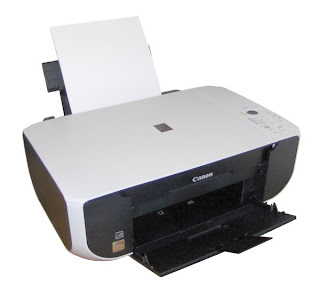
Reset Waste Ink full canon
1. Enter SERVICE MODE. By pressing Menu Copy Scan Copy Copy
2. Select TEST MODE.
3. Select [8] PRINTER TEST in TEST MODE.
4. Select 3. [EEPROM CLEAR].
5. Select 0. [INK COUNT].
6. Press the [Set] key.
7. Press the [Stop/Reset] key (returning to the state of
3)), and then press the [ON/OFF] key
Tuesday, October 27, 2009
mptool reset mp190

1. Start with printer OFF
2. Hold down STOP/RESET and then hold down POWER
3. Release STOP/RESET (don�t let go of the power just yet)
4. press STOP/RESET twice, then release POWER
5. let green light blink until printhead has finished moving.
6. Run Service Mode Tools Version 1[1].050
7. Set location Set: ASA (Asia Pacific) depends on your location
8. Put paper in paper feeder Set Clear Waste Ink Choose: Main&Plater
9. Test Print Click Cleaning1 Button
Saturday, October 10, 2009
Reset the Ink Level for Canon MX300
- Disconnect the power cable
- Connect it while holding down the power button
- With the power button still down, press twice the "Cancel/Stop" red button
- Release the power button
- The printes turns into a kind of factory mode...(wait for about 10 seconds, utils it says "Idle")
- Press the ">" (next to the "OK" button) once."Shipping Mode 3"
- Press the "OK" button.
- Press "OK" again for "Without cleaning"
- A test page will print..
- Open the cover, like you are about to change the cartridges.
- Disconnect the power cable again.
- Take out both cartridges.
- Close the cover.
- Connect the power cable once again.
- Turn the printer on.
- Now just put the cartridges back...
Thursday, May 28, 2009
Canon Resetter english
Canon Reset Etc in english ( manual reset instruction )
http://www.divshare.com/download/1235274-1a2
Cara2 Pemakaian Canon in Indonesian
http://www.divshare.com/download/1235275-2a3
i320-i255win98
http://upload.divshare.com/download/1235493-6a9
i320-i255
http://www.divshare.com/download/1246525-8dc
ip1000
http://www.divshare.com/download/1256884-740
resetter more
Subscribe to:
Posts (Atom)
